Saturday, January 07, 2012

HP Designjet T790 (A1) vs Canon iPF650 (A1) vs Canon iPF605 (A1) Review - Which LFP model best fit corporate offices with limited space

The end user is a multinational company dealing in solutions to optimize energy and operational efficiencies of buildings. The head quarter of its operation in Malaysia is located at The Garden South Tower, Mid Valley City, Kuala Lumpur.

The Garden South Tower, Mid Valley City, KL
The company has decided to acquire a A1 size wide format printer. In the past, all the technical drawings were printed at fast print shops. Although the print volume is not that high, but the operation manager of the said company believes that it is more appropriate to own a plotter with the following benefits:
  1. Cost effective- Fast print shop is charging A1 color CAD drawing at MYR4.00 per piece. It will only costs user about MYR1.00 per A1 print (paper and ink) by printing in-house.
  2. On-demand printing 
  3. Better control of confidentiality
  4. Improve productivity
Epson Stylus Pro 7700

As usual, Several vendors representing 3 major brands of large format printer namely Canon imagePROGRAF, HP Designjet and Epson Stylus Pro were invited to bid for the deal.

User requirements:
  1. A1 size
  2. High speed CAD printing
  3. Network- Work group environment (5 users)
  4. Ergonomics
A total of 5 models were proposed by the vendors as below:
  1. Canon iPF605
  2. Canon iPF650
  3. Epson Stylus Pro 7700
  4. HP Designjet 510 (24-inch)
  5. HP Designjet T790 (24-inch)
Canon iPF605
Epson Stylus Pro 7700 and HP Designjet 510 were filtered out at the first evaluation due to the slow printing speed. The user tested all the 5 printers with a complicated vectors file and commented as below:
"HP Designjet 510 is the slowest in term of file processing. The DJ510 started print about 15 minutes after the "Enter" key is hit."

"Epson Stylus Pro 7700 printing speed is ridiculously slow. I lost my patience seeing the print head moving left and right like never ending. The printer is also very bulky as compared to the Canon iPF and HP Designjet" 
HP Designjet T790 (24-inch) e-Printer

"Canon iPF605 and Canon iPF650 are very impressive on the printing speed and ease of use. The HP Designjet T790 is also not bad in term of productivity; and it comes with sophisticated  feature like connecting to the cloud. But our technical documents are classified as confidential; furthermore the IT department does not like the idea of getting an printer that is able to connects to the web."
Canon iPF650


The vendors were requested to perform an on-site demo with shortlisted A1 Plotter as below:
  1. Canon iPF605
  2. Canon iPF650
  3. HP Designjet T790
 Again, below are the comments from the users.

"It is very difficult to load the paper from the front for HP Designjet T790. And with limited space, we are unable to access from behind."


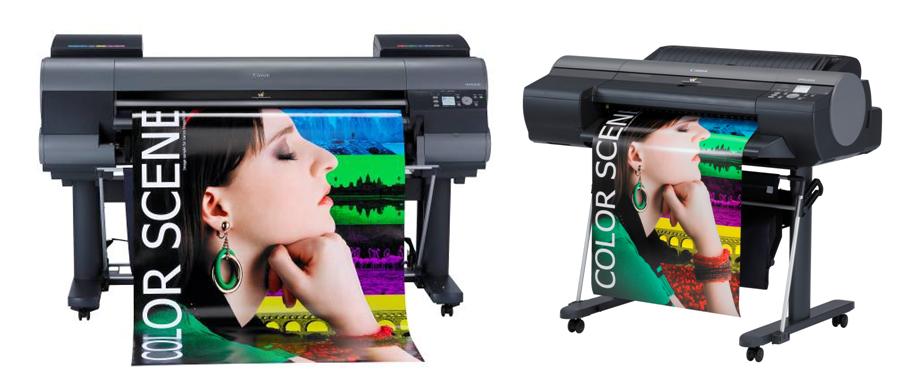
"It is easy to load paper from the front for Canon iPF605 and Canon iPF650. Canon iPF650 is even better than Canon iPF605 because users can just drop the roll holder as soon as it is on track and the paper roll will be seated automatically."

Finally, the Canon iPF650 was chosen. Look at below pictures and you will understand why size does matter and front accessibility is important for corporate office with limited space.


Saturday, December 31, 2011

Canon iPF9300 & iPF9300S to make debut by mid-2012


Canon iPF8300 & iPF6300
Canon iPF6300 & iPF8300 were introduced to the market since quarter 3, 2010. Subsequently the 8-color line-up of Canon iPF S series has upgraded the Canon iPF6000S & iPF8000S to Canon iPF6300S & iPF8300S in quarter 2, 2011.

Canon iPF9100
 What happens to the iPF5100, iPF9100 and iPF9000S? 
In the market, many of the 17" and 60" wide format printers buyers are holding on in acquiring a new printer until the iPF5300, iPF9300 and iPF9300S are made available to the market by Canon Inc.

HP Designjet Z6200
Professional Photography & Graphic Design users have already recognized the improvement of the Lucia EX pigmented ink technologies that provides high color consistency and stability with much wider color gamut as compared to the previous version of Lucia pigmented ink technology.

Epson Stylus Pro 11880
The users wanted to own a 17" and 60" large format printer that deliver finest print quality as per the Canon iPF6300 and iPF8300. They are not willing to compromise in the printing quality by taking up the Canon iPF5100, iPF9100, HP Designjet Z6200, Z5200, Z3200, Z2100 and Epson Stylus Pro 4900, 7900, 9900 & 11880.

According to the reliable source,  the long wait of Canon iPF9300 & iPF9300S will be over in 2012.

Wednesday, December 28, 2011

Effective Inventory Control Method for Large Format Printer Users

Recently, I have received some emails inquiries from large format printers users on stock availability of certain large format printer consumable items at their location. For example, there is an email inquiry from a Canon iPF6300 user who urgently needed a PFI-105GY (grey color ink cartridge) on Saturday. Two days later, another user of Canon iPF9100 is looking for immediate supply of PFI-701R (Red color ink cartridge).

Canon iPF8300 (12-color) 44" Large Format Printer
These phenomenons have signaled both good and bad news. The good news is none of these inquiries (not limited to the above 2 examples) are looking for consumables for CAD plotting applications. One of the objectives for me to create this blog is to make known to large format printers users on where to buy large format printers' consumables such as ink cartridges, maintenance cartridges, print heads and papers. As compared to the past (year 2008 and before), most of the users have started to keep some buffer stock and know where to locate the nearest resellers.

The bad news is the large format users in graphic arts industry (mostly uses 12-color LFP such as Canon  iPF6300, iPF8300, iPF9100, HP Designjet Z3200, Epson Stylus Pro 4885) are still facing challenges in effective inventory control on the large format printer consumable items.


Effective Inventory Control Method for Large Format Printer Users

First of all, the users must identify the consumable items that are needed to be in the monitoring list of the inventory control system. For example, if you are a Canon iPF6300, you need to keep the followings:
PFI-105 ink cartridges

1. Ink Cartridge (12 color PFI-105 ink tanks)
2. Maintenance Cartridge (MC-16)
3. Printhead (PF-05)
4. Paper rolls (Satin, Glossy, Fine Arts, Canvas, etc)

Read below post for details.

Impelenting The 1+1 Inventory Control System

The is a very simple and easy system to follow.
1+1 => 1set of consumables installed at the printer + 1set of spare consumables at store

For example, when the red color ink cartridge at the printer is empty, the user is going to replace a new ink cartridge. Thus, the red ink cartridge at the store is utilized. When such event taken place, user shall immediately place an order with the vendor. This will allows approximately 2 weeks lead time until the same color is running out again.

Bear in mind that the printer needs all the 12-color ink tanks to operate, any color running out will cause unwanted operation downtime. If the users face challenge in keeping track the inventory level of these 12-color ink cartridges, similar challenges will be faced by the vendors in fulfilling the market demand.

Effective inventory control will not only help the users to boost up the productivity, but cut down unnecessary cost like adhoc ordering, and urgent delivery cost.

LinkWithin

Related Posts with Thumbnails